


To make sure your rewards are correctly credited and your gameplay statistics are tracked, please verify that the Telemetry setting is enabled in your game.
How to check telemetry settings
- Launch Kingdom Come: Deliverance II.
- Go to Settings > Game Settings.
- Make sure that Telemetry is turned ON.
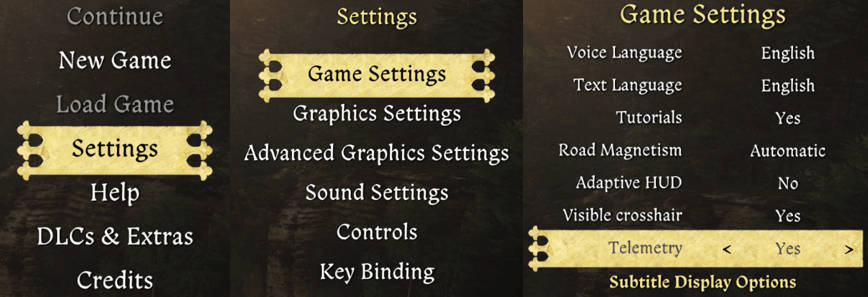
This setting is essential for tracking your in-game statistics and ensuring your rewards are processed correctly.
If rewards haven’t appeared
If Telemetry is already enabled but your rewards haven’t appeared yet, we recommend refreshing the link between your Deep Silver Account and the game.
Follow these steps:
- Visit the Deep Silver Account website and select Kingdom Come: Deliverance II.
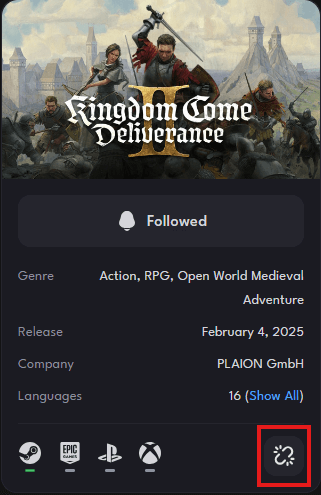
- Click the Unlink platform button on the right side (next to the platform icons) to unlink the platform you are playing on.
How to re-link your account
- Launch Kingdom Come: Deliverance II.
- Navigate to DLCs & Extras > Deep Silver Account.
- Scan the QR code or select "F1" to directly open the Deep Silver Account website.
- If prompted, sign in to your Deep Silver Account again.
For more detailed information about linking and unlinking, please refer to this article: Linking and Unlinking
Where can I access my Deep Silver Account items?
Deep Silver Account rewards can be found in your shared stash after completing the mission "Laboratores". These shared stashes can be found when purchasing lodging that includes a shared stash in selected taverns, or by following the main quest line, where they can be found in your shared stash, which is in the room the local miller and blacksmith let you use after you complete the first part of their quests.
Reward Processing Time
Once your game is correctly linked and Telemetry is enabled, please allow up to 48 hours for your rewards to be processed and appear in your account.
If you still experience issues after this time, please don’t hesitate to contact our Support Team by clicking on the “Contact Support” for further assistance.
When submitting your support ticket, please include the following information to help us resolve your issue more quickly:
- Deep Silver Account email address
- Screenshot showing that Telemetry is active
- Screenshot of the missing rewards in your Deep Silver Account